
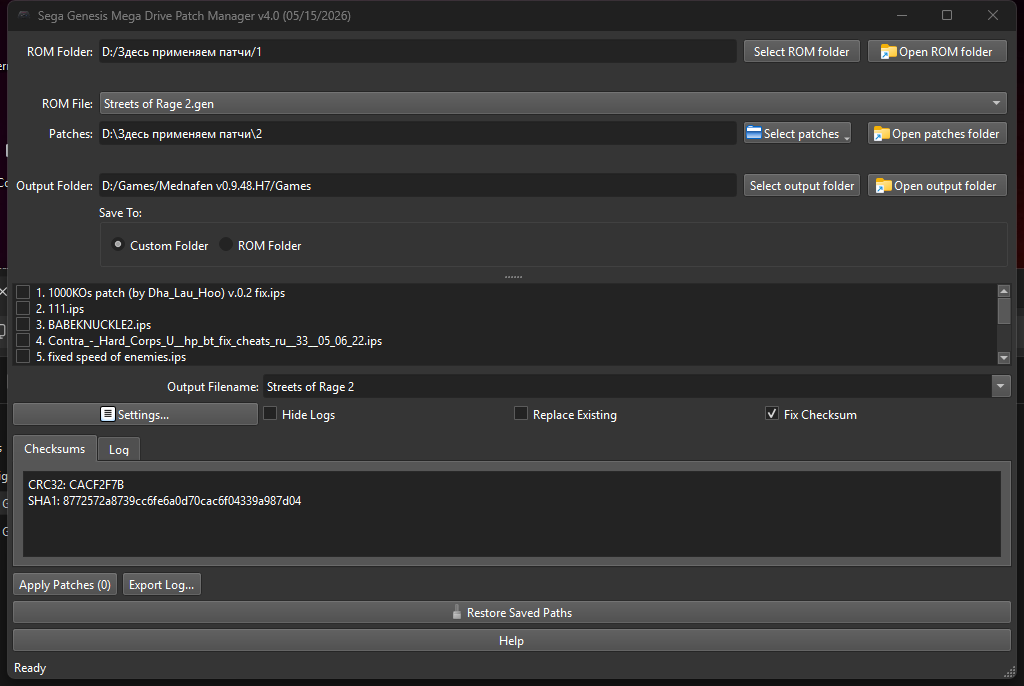
Patch Manager Sega Genesis is a program for applying IPS patches to Sega Genesis games. Version 4.1 is a minor update to version 4.0: this release doesn’t introduce any major changes, but includes just a few small adjustments, which are described below.
Main features:
Fast and safe application of one or several patches to a single ROM file.
Supports the following ROM formats: .bin, .smd, .gen, .md.
Doesn’t require Python to be installed — ready to use right after downloading.
The original ROM isn’t damaged (it’s copied to a temporary file).
The built‑in IPS parser supports both regular and RLE‑compressed patches.
Key features:
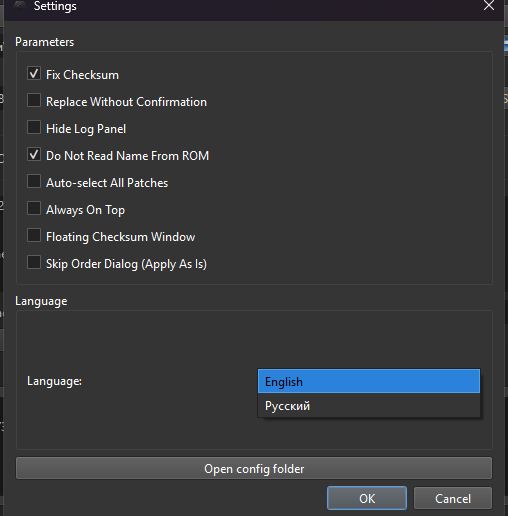
Automatic checksum correction after applying patches (prevents red, black, or blue screens when launching a game).
Important note: you can mostly avoid a red screen if you don’t uncheck “Fix checksum”.
Experimental bypass of Electronic Arts protection (replacing JSR+BNE with NOP) — may help run some EA games (functionality isn’t guaranteed).
Step‑by‑step instructions:
Select a folder with ROMs — either specify the folder path or drag and drop a file directly into the program window.
Add patches — you can add an entire folder of patches or individual files.
Check the required patches in the list.
Choose an output file name from the drop‑down list: the original game name (from the ROM header) or the name of any of the selected patches.
Click “Apply patches” — the program will start processing.
What’s new in version 4.1 (compared to 4.0):
As mentioned, version 4.1 doesn’t include any major updates. The following minor improvements have been added:
A single patch is now checked automatically. If there’s exactly one IPS file in the list, the program checks it automatically — manual checking is no longer needed.
Clear error messages for corrupted or non‑IPS files. When you try to apply a text file (for example, readme.txt) or a corrupted IPS file, the program shows a specific message — such as “The file appears to be a text file” or “IPS file is corrupted: incomplete block”, instead of the generic “Invalid IPS file”.
All other features from version 4.0 remain unchanged:
Language integration in one program — Russian and English in a single file (language selection at startup).
Floating checksum window — CRC32 and SHA1 can be moved to a separate window.
Two save modes: to a selected folder or next to the original ROM (with a different name; the original isn’t overwritten).
Log export — all program messages can be saved to a text file.
Free disk space check (at least 100 MB) before starting.
Experimental EA protection bypass (replacing JSR+BNE with NOP).
“Restore saved paths” button — clears temporary drag‑and‑drop data and returns to the last saved paths from the configuration.
Improved first‑run wizard — can now be skipped and remembers already selected folders.
Option to disable automatic selection of recent folders — in version 3.0, auto‑selection was always enabled; now it can be turned off.
Patch order is now set via a drag‑and‑drop dialog instead of checkboxes.
Automatic backup has been removed — it’s unnecessary since the original ROM is never modified.
Patch conflict analysis (HTML reports, compatibility percentages) has been removed — this feature slowed down development and was unstable. The author plans to bring it back in the future in a better form.
Overall code optimization — the program is faster and more stable.
Version history (public releases only):
Version 3.0 (August 1, 2025): first‑run wizard, configuration in config.ini, ROM folder selection and ROM file drop‑down list, full conflict analysis with HTML reports, “Checksums” and “Log” tabs, drag‑and‑drop, settings (disable ROM name, auto‑replace, hide logs), remembering last folders (always enabled), separate builds for Russian and English.
Version 4.0 (May 15, 2026): language integration in one program, floating checksum window, two save modes, log export, free disk space check, experimental EA protection bypass, “Restore saved paths” button, improved first‑run wizard (can be skipped), option to disable auto‑selection of folders, patch order via drag‑and‑drop dialog (instead of checkboxes), automatic backup removed, conflict analysis removed (to be improved later), overall optimization.
Version 4.1 (June 11, 2026): automatic checking of a single patch; clear error messages when trying to apply a text or corrupted IPS file.
DeepSeek – neural network that implemented all the code.
uuuser – creator of the first batch file, tester, programming consultant.
Sharpnull – tester, suggested feature ideas.
Ramzet – tester, suggested some ideas.

Number of Comments: 0
View comments