Description
Game Genie Guy by Kyle (20150313)
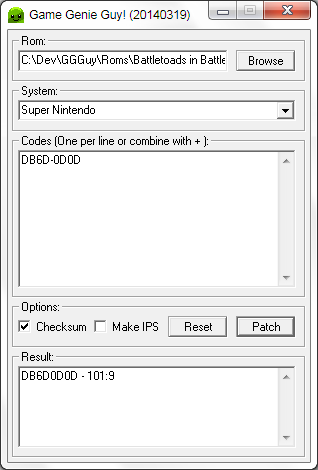
This is a small Windows utility for applying Game Genie codes to roms. This saves you the trouble of having to enter them each time the game is played.
Usage:
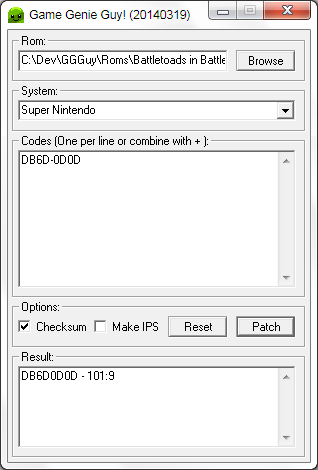
- Click the Browse button and select an unzipped Game Boy/Game Gear/Genesis/NES/SNES rom
- The system dropdown should populate based on the file extension
- The checksum box will also be enabled for non-NES games
- Enter the desired codes, one per line. Multiple codes can be combined with +
- Click Patch when all codes have been entered
- Open the created 'File GG.rom' in an emulator to test
Checksum:
uCON64 is used for checksum correction. This is required if you are using flash carts. Most emulators are not bothered by it. I recommend the MinGW version because it has no dependencies.
Download ucon64-2.0.0-win32-mingw-bin.zip and extract ucon64.exe to same folder as GGGuy.exe: http://ucon64.sourceforge.net/
Notes:
Master System and PC Engine support added. Only use the codes from the supplied text files. Pro Action Replay codes are not supported.
Not all codes like being applied in this fashion. Ex: Contra Hard Corps 99 lives work fine while infinite lives does not. If you do not get the desired result try another code.
8 digit NES codes are preferrable to 6. 8 digit codes contain validation that ensures the game is being patched in the right spot. 6 digit codes just go for it. Applying too many 6 digit codes can make a game crash. Try fewer codes if this occurs.
Use BIN or GEN roms for Genesis/Mega Drive. SMD roms are not supported.
Troubleshooting:
If you can't get a code to work try the following:
- Try a different code. If another code works then the file is being patched properly.
- Try a different rom - look for a good dump (!) or use Nointro roms.
- Try it with CCCGP to see if it works. If it does let me know with the full rom name and code you are using. I'll check it out. http://crackerscrap.com/projects.php
Why would I use this instead of CCCGP?
Tiny standalone file (60KB) - no DLLs/dependencies/registry writes System auto-detection based on the rom's extension Original files are copied to avoid overwriting: mario.nes - mario GG.nes Auto-fixes checksum if uCON64 available Always on top for easier pasting of codes from browser Simplified code input doesn't require description Full source code provided
Thanks to:
cracker: CCCGP WyrmCorp: UGGCONV/source Lazy Bastard: tutorials John David Ratliff: tutorials Tony Hedstrom: tutorials Zazer: ggconv Maël Hörz: HxD
References:
http://gamehacking.org/library/114 http://www.videogamesource.com/genie/gg/gghandbk/p12.html http://www.ticalc.org/cgi-bin/zipview?92plus/asm/source/ggdecodesrc92.zip;snes.txt http://romhack.wikia.com/wiki/SNES_header
Source code is provided. BCX and LCC are required to compile:
http://www.bcxbasic.com/ http://www.cs.virginia.edu/~lcc-win32/
Changelog:
20150313: Fixed SNES checksum patching issue 20140609: Added IPS patching. Open an IPS file then open a rom 20140527: Added support for Master System Game Genie format codes 20140418: Added hex code support. Use format XXXX:XX. Overall code cleanup 20140414: Rewrote SNES code to fix non-working games 20140411: Added GBC extension which works fine with existing GB code 20140405: Adjusted offset again for SMB3 problematic codes 20140328: Adjusted NES starting offset for Legend of Zelda 20140319: Added nags for missing uCON64 20140319: Added log reset button 20140318: Reworked GUI and added IPS creation 20140317: Fixed a SNES issue that affected Battletoads in Battlemaniacs 20140124: Bumped line count to 200 after a code was shown that was ~160 lines 20140122: Alternate modes for patching, later removed in favor of file size 20140120: Multi-line code support, separated with a + sign. Both " + " and "+" are valid 20140119: Added support for Master System/PC Engine (using supplied codes) 20140117: Initial release
Gallery
Last comments
Post a comment