Description
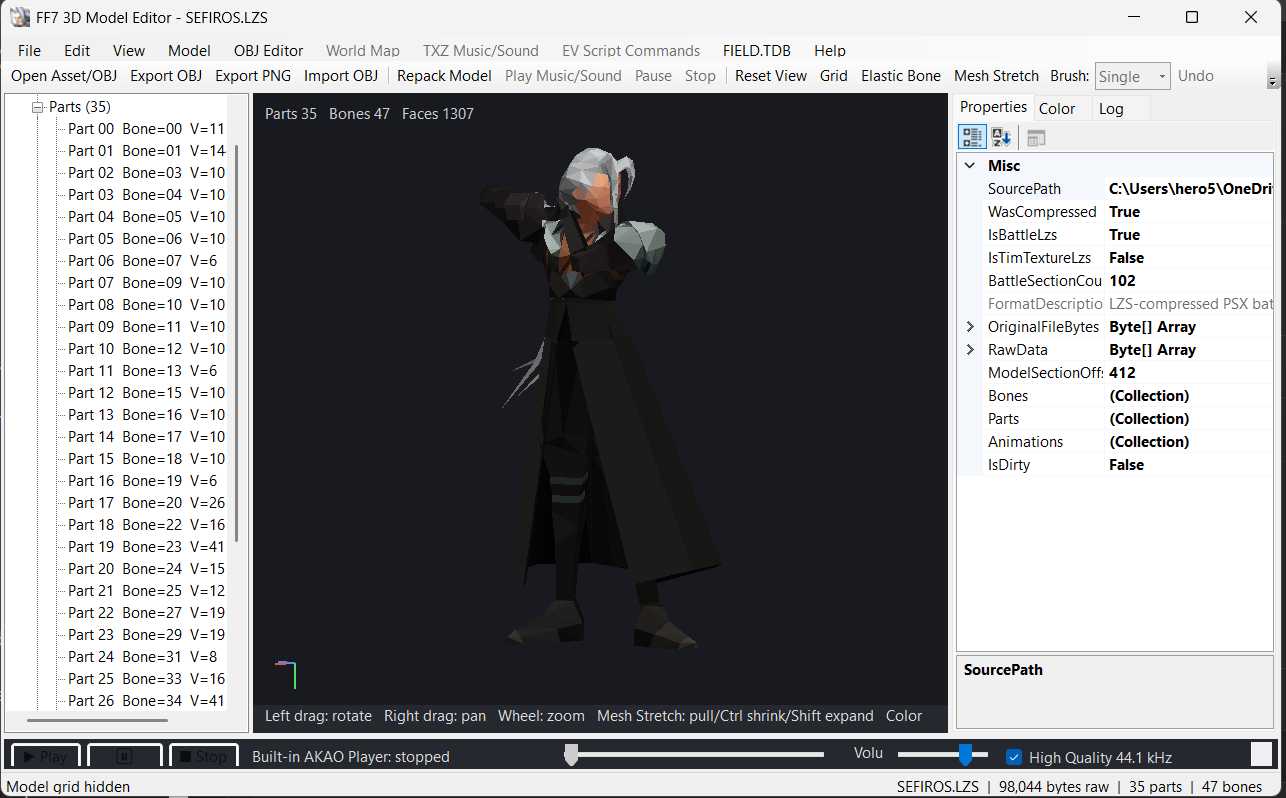
Final Fantasy VII 3D Model Editor
Created by Shadow501
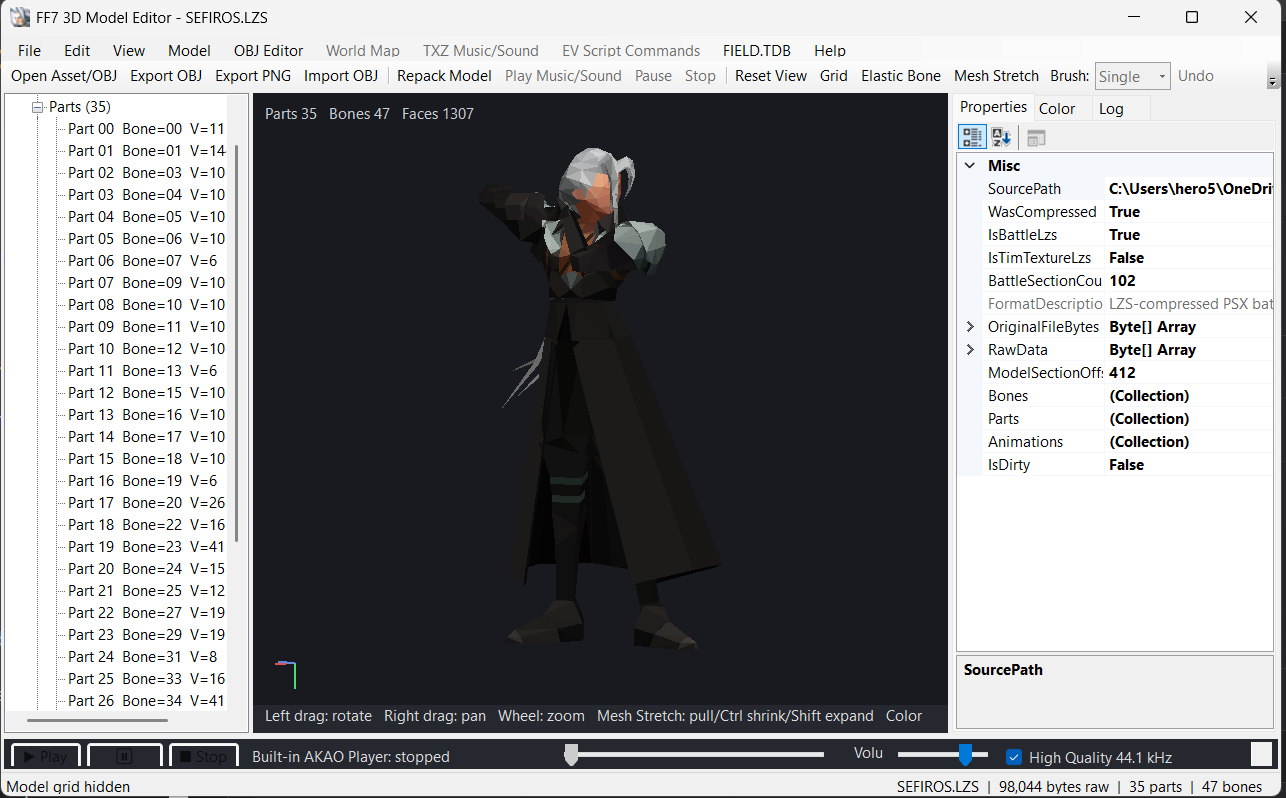
Final Fantasy VII 3D Model Editor is an advanced Windows editing tool designed for modifying models and related assets from the original PlayStation version of Final Fantasy VII.
The editor brings together 3D model editing, animations, bones, polygons, colors, palettes, textures, FIELD assets, world-map files, scripts, audio, and PlayStation BIN/CUE rebuilding in one application.
The project is actively being improved, and additional compatibility, scanning accuracy, and editing features are planned for future versions.
Main Features
- Open compressed and decompressed Final Fantasy VII .BCX field models
- Open and edit FF7 battle .LZS models
- Preserve important battle-LZS archive sections while editing model geometry
- Display FF7 models directly inside the built-in model viewer
- Browse individual models or complete LZS folders
- Live model preview
- Mouse rotation
- Pan
- Zoom
- Reset camera
- Wireframe / polygon grid display
- Skeleton display
- Direct model selection
- Edit model geometry without requiring an external 3D viewer
Bone Editing
The editor contains extensive tools for working with FF7 skeletal models.
- Select Bones directly from the model
- Select Bones from the model tree
- Copy Bones
- Paste Bones
- Remove Bones
- Export individual Bones
- Import individual Bones
- Export all Bones
- Import complete Bone/model packages
- Resize Bones manually
- Uniform Bone scaling
- Independent X / Y / Z Bone scaling
- Preserve Bone center and location while resizing
- Automatically fit imported BCX Bones to destination geometry
- Preserve destination Bone bind-pose position
- Undo Bone modifications
- Redo Bone modifications
Elastic Bone Editing
Bones can also be manipulated interactively inside the model preview.
- Enable Elastic Bone editing mode
- Drag Bones directly with the mouse
- Attached Parts follow the selected Bone
- Child Bones follow the edited Bone hierarchy
- Adjustable Bone elasticity
- Undo Elastic Bone changes
- Redo Elastic Bone changes
This allows model proportions and poses to be modified visually instead of editing coordinates manually.
Part Editing
The editor supports individual FF7 model Parts such as:
- Head
- Face
- Hair
- Chest
- Arms
- Hands
- Legs
- Feet
- Other character mesh sections
Available Part functions include:
- Select Part
- Copy Part
- Paste Part
- Export Part
- Import Part
- Undo Part changes
- Replace compatible Part geometry
- Preserve the rest of the model when editing only one Part
Polygon / Mesh Editing
Model geometry can be edited directly.
- Display FF7 polygon packet types
- Edit triangles
- Edit quads
- Preserve model topology when required
- Work with individual model Parts
- Import compatible edited geometry
- Modify body and hair shapes
- Undo geometry modifications
- Redo geometry modifications
Mesh Stretch Editor
The built-in Mesh Stretch mode allows local geometry editing directly inside the 3D preview.
Available brush sizes include:
- Single
- Small
- Medium
- Large
- X-Large
Mesh Stretch can be used to:
- Pull geometry
- Shrink areas
- Expand areas
- Change body proportions
- Modify hair
- Adjust individual local mesh regions
This provides a fast visual method for editing FF7 models without manually entering vertex coordinates.
Model Resize Tools
The editor contains several methods for resizing models.
- Extend complete model by percentage
- Shrink complete model by percentage
- Custom model scaling
- Safe BCX resizing
- Resize individual Bones
- Preserve model structure
- Undo model-size changes
The safe resize system is designed to preserve Bones, Parts, meshes, and geometry wherever possible.
Animation Editor
The editor includes built-in support for FF7 skeletal animations.
- Detect BCX animations
- Browse available animations
- Play selected animation
- Pause animation
- Loop animation
- View current animation frame
- Select animations individually
- Copy animations
- Paste animations
- Delete animations safely
- Import animation data
- Export animation data
Create New Animations
New animation data can also be created.
Supported creation options include:
- Neutral animations
- Duplicated animations
- Reversed animations
- Ping-pong animations
The editor can also append a completely new animation slot to a BCX model.
For example:
Animations (3) → Animations (4)
or
Animations (4) → Animations (5)
Animation table data is relocated when required.
FF7ANIM Support
Animations can be exported and imported using the custom:
.ff7anim
format.
This allows animations to be:
- Backed up
- Shared
- Modified
- Reinserted into models
- Added as new animation slots
OBJ Export / Import
Wavefront OBJ support is included for external 3D editing.
- Export complete FF7 models to .OBJ
- Export selected Parts to OBJ
- Import edited OBJ geometry
- Import compatible vertex positions
- Edit BCX geometry externally
- Edit compatible battle-LZS geometry
- Preserve required FF7 model topology during safe imports
OBJ files can be edited with compatible 3D applications and imported back into the editor.
Standalone OBJ Editor
The program also includes a standalone Wavefront OBJ editor.
You can:
- Open your own OBJ file
- Display OBJ geometry
- Browse OBJ groups
- Edit vertices
- Edit vertex colors
- Transform selected groups
- Transform the complete OBJ
- Resize geometry
- Center geometry
- Save OBJ
- Save OBJ As
- Undo OBJ modifications
This functionality can be used independently from FF7 BCX/LZS files.
Color Editor
The editor contains an advanced built-in model color editor.
Supported color modes:
- RGB
- HSL
- HSV
Colors can be edited for:
- Entire model
- Selected Part
- Selected Bone
Other color functions include:
- Select model colors
- Copy Color
- Paste Color
- Live color preview
- Highlight polygons affected by the selected color
- Undo color changes
- Redo color changes
Palette Editing
FF7 model palettes can be saved and replaced.
- Save all model palette colors
- Replace all model palette colors
- Save only selected Bone palette colors
- Save only selected Part palette colors
- Replace selected palette colors
- Preserve unrelated model colors
- Undo palette modifications
- Roll back incompatible changes
Custom palette packages use:
.ff7pal
PNG Model Editing
The editor can export selected model geometry to PNG for graphical editing.
Supported functionality includes:
- Export selected Part/Bone PNG
- Import edited PNG
- Four-view model PNG output
- Display actual model areas instead of simple palette blocks
- Head editing
- Face editing
- Chest editing
- Limb editing
- Other Part/Bone editing
The editor uses a verified mapping sidecar:
.ff7pngmap
This maps PNG information back to the corresponding model data.
Complete Bone / Model Packages
Complete Bone and attached Part data can be exported using:
.ff7bones
The package can contain complete model-related data for transfer between compatible models.
Functions include:
- Export every Bone
- Export attached Parts
- Import complete model packages
- Rebuild model tables when Bone/Part counts differ
- Preserve destination model hierarchy where required
BCX to Battle-LZS Conversion
The editor contains specialized tools for transferring BCX geometry into FF7 battle models.
Supported operations include:
- Convert selected BCX Bones to battle-LZS geometry
- Transfer vertices
- Transfer triangles
- Transfer quads
- Transfer model colors
- Preserve destination Bone hierarchy
- Preserve destination Bone placement
- Auto-fit source Bone size
- Rebuild visible battle-model geometry
- Preserve non-model battle sections where possible
This can be used for creating customized battle-model geometry from field-model parts.
Rebuild BCX Like Reference
A BCX model can be rebuilt based on another compatible reference BCX.
The editor can attempt to match:
- Part layout
- Animation layout
- Model structure
- Raw size
- Packed size
This is useful when an edited model must remain structurally compatible with another FF7 model.
Global Undo / Redo
The editor contains global model history support.
Ctrl + Z — Undo
Ctrl + Y — Redo
Undo/Redo can cover operations such as:
- Bone edits
- Bone posing
- Part replacement
- Mesh editing
- Mesh stretching
- Model scaling
- Color editing
- Palette editing
- Geometry changes
FIELD Folder Support
Final Fantasy VII FIELD files can be browsed directly.
The tool can:
- Open complete FF7 FIELD folders
- Browse FIELD assets
- Open individual FIELD
.DATfiles - Display supported detected content
- Import compatible edited data
- Export supported data
- Repack FIELD files
DAT Scanner
The editor includes a scanner for Final Fantasy VII .DAT files.
The scanner attempts to automatically identify and process supported data and assets inside FIELD DAT files.
Current functionality includes:
- Scan
.DATfiles - Detect supported FF7 data
- Browse detected assets
- Open individual FIELD DAT files
- Work with supported detected content
- Import/export supported assets
- Repack compatible DAT data
Current DAT Scanner Status
The DAT scanner is still under development.
Some .DAT files currently have issues and may not scan or detect all data correctly.
Possible current issues include:
- Some assets may not be detected
- Some data structures may be detected incorrectly
- Certain DAT files may show incomplete results
- Some unusual FIELD DAT layouts may not yet be supported
- Automatic scanning may occasionally identify incorrect offsets
- Compatibility may differ between different FIELD files
These issues are known and do not mean development has stopped.
Future DAT Scanner Updates
Future versions will continue to tune up and improve the DAT scanner.
Planned improvements include:
- Better scanning accuracy
- Better automatic offset detection
- Improved asset detection
- Improved compatibility with more FF7 DAT files
- Fewer false detections
- Better validation of detected data
- Improved stability
- Faster scanning
- Better handling of unusual DAT structures
- More supported asset types
Note: If a DAT file does not scan correctly in the current version, support may be improved in a future update.
FIELD.TDB Texture Support
The editor includes dedicated support for:
FIELD.TDB
Available functions include:
- Open FIELD.TDB
- Detect texture information
- Extract textures
- Export textures to PNG
- Import edited PNG textures
- Replace textures
- Repack FIELD.TDB
LZS Folder Browser
The editor can browse complete directories containing FF7 LZS files.
- Open a single LZS
- Open an LZS folder
- Recursively browse folders
- Preview compatible LZS content
- View models directly
- Identify LZS files containing TIM texture/effect images
TIM Texture / Effect Detection
Some FF7 LZS files contain TIM graphics instead of 3D model data.
The editor can recognize these files and display information such as:
- Texture width
- Texture height
- Bits per pixel
- Palette count
- VRAM position
This helps distinguish model LZS archives from graphical/effect LZS files.
World Map Editor
FF7 world-map terrain is supported through:
WM0.MAP
Available functionality includes:
- Open world-map MAP files
- Decompress world-map terrain
- Browse terrain blocks
- Browse terrain meshes
- Display terrain geometry
- Export selected terrain block to OBJ
- Export complete terrain to OBJ
- Import compatible edited terrain geometry
- Undo terrain mesh changes
- Repack world-map data
TXZ Music / Sound Editor
The editor supports FF7 world-map:
.TXZ
archives.
TXZ tools include:
- Open TXZ archive
- Detect archive sections
- Detect AKAO music/sound sections
- Browse AKAO entries
- Extract selected section
- Extract all AKAO sections
- Replace selected section
- Edit selected section as hexadecimal data
- Undo TXZ section modifications
- Repack TXZ archives
Built-in AKAO Player
Selected AKAO music/sound sequences can be previewed using the built-in player.
Controls include:
- Play
- Pause
- Resume
- Stop
- Position control
- Volume control
- High-quality playback option
This allows audio sections to be checked before repacking the TXZ archive.
EV Script Editor
The editor supports FF7 world-map:
.EV
script files.
Functions include:
- Open EV scripts
- Browse script functions
- Browse script commands
- Edit selected functions
- Edit script commands
- Edit Model IDs
- Edit Object IDs
- Edit locations
- Edit command words
- Disable selected Model/Object script calls
- Restore previously disabled script calls
- Undo EV script changes
- Export script-command listings
- Repack EV scripts
Drag & Drop Support
Supported files can also be dropped directly into the editor.
Supported drag-and-drop extensions include:
- BCX
- LZS
- MAP
- TXZ
- EV
- DAT
- OBJ
Built-in FF7 BIN/CUE Rebuilder
One of the major features of the editor is its built-in PlayStation disc rebuilding system.
An edited BCX can be inserted directly into a new FF7 BIN/CUE image without requiring a separate injection program.
Functions include:
- Read original FF7 BIN/CUE
- Locate the original BCX inside the disc image
- Insert the edited BCX
- Support larger edited models when safe space is available
- Preserve the original file LBA when possible
- Update ISO9660 file-size records
- Use verified blank following sectors when necessary
- Rebuild MODE2/Form1 sectors
- Regenerate PlayStation EDC
- Regenerate PlayStation ECC
- Generate a new BIN
- Generate a new CUE
- Preserve the original disc image
- Perform byte-for-byte verification
- Reopen the injected BCX using the model parser
- Verify Bone count
- Verify Part count
- Verify Animation count
- Generate an injection report
No external tools are required for supported injections.
Safe Disc Rebuilding
The original PlayStation image remains unchanged.
The program creates a new output BIN/CUE and performs verification before reporting success.
Verification includes:
- BCX byte-for-byte verification
- BCX parser verification
- ISO9660 size verification
- LBA verification
- MODE2 EDC/ECC regeneration verification
The completed CUE can then be tested in a compatible PlayStation emulator such as DuckStation.
Supported Formats
3D Models
.BCX.LZS.OBJ
FF7 Model Packages
.ff7anim.ff7bones.ff7pal.ff7pngmap
Graphics / Textures
.PNG- TIM graphics stored inside supported LZS files
FIELD.TDB
FIELD Files
.DAT.LZSFIELD.TDB
World Map
.MAP.TXZ.EV
PlayStation Disc Images
.BIN.CUE
Development Status
Final Fantasy VII 3D Model Editor is an actively developed project.
Some advanced functions—especially automatic scanning of complex .DAT files—may still have compatibility issues.
Future releases are planned to improve:
- DAT scanning
- Model detection
- File-format compatibility
- Geometry editing
- Battle-LZS support
- Texture support
- FIELD support
- Stability
- Performance
- Automatic detection
- Repacking safety
More features and fixes will be added as development continues.
Important Note
Always keep a backup of your original Final Fantasy VII files and disc images before modifying game data.
Some FF7 formats are complex and can vary depending on the type of asset being edited.
The tool attempts to preserve original structures wherever possible, but experimental functionality should always be tested in-game after modification.
Final Fantasy VII 3D Model Editor
Model Editing • Bone Editing • Part Editing • Animation Editing • Color Editing • Palette Editing • OBJ Editing • PNG Editing • FIELD Editing • DAT Scanning • World Map Editing • AKAO Audio • EV Scripts • BIN/CUE Rebuilding
Created by Shadow501
Staff Credits
- :
Gallery
Last comments