
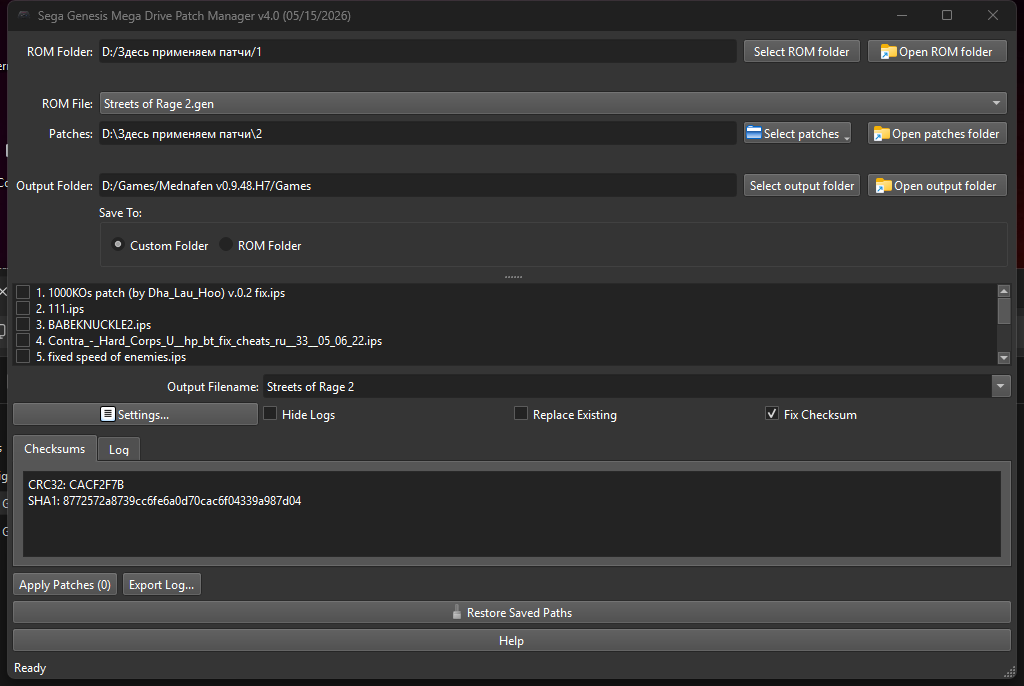
—
**Sega Genesis Patch Manager v4.0**
**Compatibility:** Windows 10 64-bit, Windows 11
**Important Note:** The program is provided as a ready‑to‑use executable file. No Python installation is required — all necessary components and dependencies are pre‑packaged within the application.
**What’s New in Version 4.0**
**Key Improvements**
– **Unified bilingual version** – Russian and English in a single program (language selection at startup).
– **Dark theme** – automatically follows your system’s light or dark mode.
– **Floating checksum window** – CRC32 and SHA1 in a separate always‑visible window.
– **Two save modes** – custom folder or directly next to the original ROM.
– **Log export** – save all messages to a text file.
– **Disk space check** – warns if less than 100 MB free.
– **“Restore Saved Paths” button** – reverts temporary drag‑and‑drop data without restart.
– **Improved first‑run wizard** – skippable, remembers previously selected folders.
– **Patch order** – drag‑and‑drop dialog (instead of checkboxes).
– **Code optimization** – faster and more stable.
**What has been removed (compared to v3.0)**
– Full patch conflict analysis (HTML reports, compatibility percentages) – will be reworked in the future.
– Automatic backup copying – not needed (original ROM is never modified).
– Separate builds for each language – now unified.
**Program Description**
**Sega Genesis Patch Manager v4.0** is a free tool that can apply multiple patches to a single ROM file. It works directly with `.bin`, `.smd`, `.gen`, `.md` images, requires no external utilities, and never modifies the original ROM (uses a temporary copy). The built‑in IPS parser supports standard and RLE‑compressed patches.
Many Sega Genesis games check integrity at boot; a wrong value may cause a red/black/blue screen. The program automatically corrects the checksum after patching. An experimental Electronic Arts protection bypass (JSR+BNE → NOP) is also available (functionality not guaranteed).
**Core Features**
– Apply one or several IPS patches (including RLE‑compressed)
– Manual patch order via drag‑and‑drop
– Automatic checksum correction (eliminates red screen)
– Flexible output naming (ROM header or patch names)
– ROM size verification (max 16 MB)
– Safe temporary file handling
– Bilingual interface, dark theme, floating checksum window, log export
**How to Use**
1. Select a ROM folder (or drag & drop a ROM file).
2. Add patches (individual files or entire folders).
3. Check desired patches.
4. For multiple patches, set order via drag‑and‑drop dialog.
5. Choose output name and save mode.
6. Click “Apply Patches” – progress shown, checksum corrected automatically.
**Important Notes**
– First launch: language selection dialog + optional first‑run wizard (can be skipped).
– Use “Restore Saved Paths” button to revert folders after accidental drag‑and‑drop.
– No automatic conflict analysis in v4.0 (will be reworked later). If a game stops working after two patches, change order or use only one.
– Checksum correction is enabled by default and prevents red screen on real hardware.
DeepSeek – neural network that implemented all the code.
uuuser – creator of the first batch file, tester, programming consultant.
Sharpnull – tester, suggested feature ideas.
Ramzet – tester, suggested some ideas.

Number of Comments: 0
View comments